• Skip to primary navigation
  • Skip to main content
  • Skip to primary sidebar

Meet Ashwin

Helping Engineers To Become Tech Leaders

  • Blog
  • Newsletter
  • Courses
    • Generative AI 101
    • LLMOps 101
    • Data Platforms Made Easy
  • Products
    • Generative AI Ecosystem Mindmap
    • 8 Mistakes to avoid in Tech Leadership (e-book)
  • Resources
  • Contact

Blog

Agent Memory : Why Agents Need Memory and How to give them one?

November 22, 2026 by Ashwin Leave a Comment

Picture a brilliant colleague who wakes up every morning with no memory of yesterday. That is most AI agents today and the reason why they need an agent memory.

In this post, let’s talk about:

  • 🧠 Why agents need memory, and the four types that matter
  • ☁️ What “managed” memory really means, and where it adds value
  • πŸ› οΈ How to build it with cloud services or open source

🧠 Why agents need memory

Large language models are stateless: every call starts from a blank page. What feels like memory in a chat is the app re-sending the history.

That works for a demo. It breaks in production:

  • πŸ” Blank slate every session: users re-explain goals, constraints and preferences again and again
  • 🎯 No personalization: the agent cannot adapt to a person, a client or a team over time
  • πŸ”‚ Repeated mistakes: a lesson learned on Monday is gone by Tuesday
  • ⏳ Long-running work breaks: tasks that span days, or hand off between agents, lose their thread
  • πŸ’Έ Context stuffing is expensive: replaying full history in every prompt costs tokens and latency, and still hits the window limit

The shift: memory turns an agent from a tool you operate into a colleague who compounds.

🧩 The four types of agent memory

Borrowed from cognitive science, four types cover most of what agents need:

TypeWhat it holdsPurposeExample
πŸ—’οΈ Working (short-term)The live conversation and scratchpad for this taskStay coherent within a sessionThe last 20 turns of a support chat
πŸ“– EpisodicSpecific past events and interactionsRecall what happened last time“The refund failed on Tuesday because a document was missing”
πŸ“š SemanticDistilled facts and preferencesKnow who and what“Prefers a one-page summary every Monday”
🧰 ProceduralRules, playbooks and learned ways of workingDo the job better each time“Reconcile accounts before drafting the report”
  • 🧠 Rule of thumb: working memory is a notepad; long-term memory is a notebook someone curates
  • πŸ”€ Cloud services usually split it in two: short-term holds raw events inside a session, long-term holds extracted insights that survive across sessions

☁️ What “managed” memory really means

Managed agent memory is a service that runs the memory lifecycle for you, so your team builds the agent, not the plumbing.
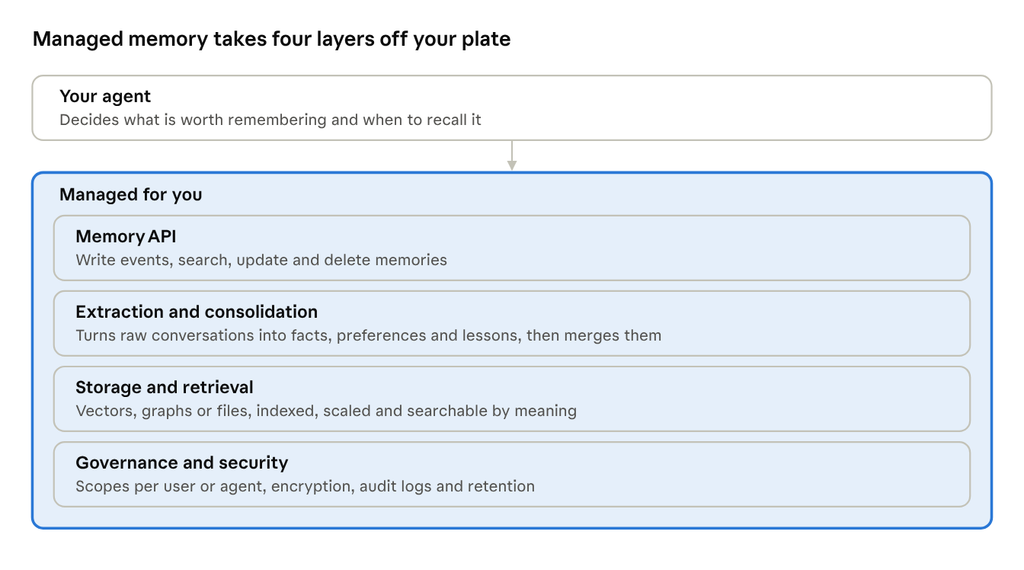
Managed Memory Stack.  4 Managed Layers.
Managed Memory Stack. 4 Managed Layers

Your agent decides what matters. The service handles extraction, storage and governance.

Nuances worth knowing before you commit:

  • πŸ”„ A lifecycle, not a database: write, extract, consolidate, retrieve and forget are all part of the job
  • πŸ›‘οΈ Scope is a security boundary: Databricks advises setting scope in trusted code and never letting the model choose whose memory to read or write
  • 🧹 Conflicts need resolving: when a preference changes, old and new facts must be reconciled; one community evaluation found Mem0 kept both versions, so test this
  • ⏱️ Often asynchronous: AWS extracts long-term memory in the background, so a fact from this turn may not be recallable instantly
  • πŸ“¦ Portability varies: Claude Managed Agents stores memories as files you can export and manage through an API; other services use their own stores
  • πŸ’° Cost has two parts: extraction runs models on writes, plus storage; Databricks bills the underlying Lakebase instance during its preview

πŸ“ˆ How managed memory adds value

  • ⚑ Faster to production: no extraction pipelines, indexes or scaling to build; one adopter said it let them stop building memory infrastructure and focus on the product
  • 🎯 Better outcomes: Anthropic reports that Rakuten’s agents saw 97% fewer first-pass errors, 27% lower cost and 34% lower latency with memory; Wisedocs reports 30% faster document verification
  • πŸ›‘οΈ Governance built in: scoped permissions, audit logs and encryption come standard; AWS supports customer-managed encryption keys and Databricks applies Unity Catalog governance
  • 🀝 Shared learning: one store can serve several agents with different access scopes, so lessons compound across the fleet
  • πŸ§‘β€πŸ’Ό Personalization at scale: each user or client gets a memory that stays isolated from everyone else’s

⚠️ Reality check: these figures are vendor-reported on specific workloads. Benchmark on your own tasks before you plan around them.

πŸ” How agent memory works under the hood

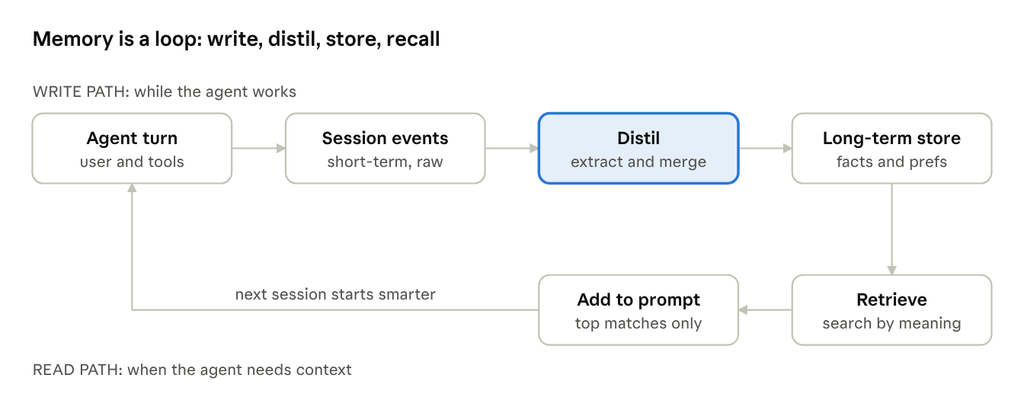
Memory Lifecycle. Write and Read Path.

Writes land as raw events. A background step distils them into durable memories. Reads pull back only the top matches, so each new session starts with context instead of a blank page.

  • πŸ§ͺ What gets extracted is configurable: AWS AgentCore Memory ships built-in strategies for summaries, facts and user preferences, and lets you supply custom prompts and models
  • πŸ—‚οΈ Everything is keyed: memories are organized by user, agent and session so retrieval stays fast and isolated

☁️ Build it on cloud services

Here are a few managed memory options that are available today.Β  All three are young, so check current maturity before you commit.

ServiceHow memory is modeledStandoutWatch-outs
🟧 AWS Bedrock AgentCore MemoryShort-term events by actor and session; long-term records from built-in or custom strategiesEncrypted at rest and in transit, optional customer-managed keys, raw events kept up to 365 daysLong-term extraction runs asynchronously
🟫 Claude Managed Agents memory (public beta)Memories stored as files mounted on the agent’s filesystemExportable, managed through an API, audit log shows which agent and session wrote each memoryPublic beta; built for Managed Agents
πŸŸ₯ Databricks managed agent memory (beta)Memory stores as Unity Catalog securables, isolated by scopeWorks with agents on any framework; inherits Unity Catalog governance, access control and lineageLong-term only, so pair it with session history; the store is the security boundary

How to choose:

  • πŸ—οΈ Already on AWS? AgentCore Memory fits natively next to your runtime and observability
  • πŸ—„οΈ Data estate on Databricks? Memory sits under the same governance as your tables
  • πŸ€– Building on Claude Managed Agents? Memory is built in and file-based, so it is easy to inspect and export

πŸ› οΈ Build it with open source

Three projects lead the field, and each stores memory differently:

ToolMemory modelBest forWatch-outs
🧬 Mem0Vector memory layer with simple add and search calls, framework-agnosticQuick personalization for an existing agentModel calls on writes add latency and cost; test how it handles changed facts
🧠 Letta (formerly MemGPT)Agent-managed memory blocks: the agent edits its own memoryLong-lived, stateful agents that curate their own contextCloser to an agent runtime than a memory API
πŸ•ΈοΈ Zep / GraphitiTemporal knowledge graph of entities and relationshipsFacts that change over time, relationship-heavy domainsNeeds a graph database; new facts may not be searchable instantly
  • 🧱 You own the plumbing: hosting, scaling, backups, access control and observability sit with your team
  • πŸ”Œ Flexible deployment: each project can be self-hosted, and each also offers a hosted plan
  • πŸ§ͺ Test before you choose: community harnesses such as memeval and MemJudge compare providers side by side on recall, relevance and cost

🧭 A six-step playbook for teams

  1. 🎯 Start from the job, not the tech: list what the agent must remember, and what it must forget
  2. 🧩 Choose memory types on purpose: working memory for the session, semantic for facts, episodic for history, procedural for lessons
  3. πŸ” Design scope and access first: per user, per agent or shared, set in trusted code and never by the model
  4. πŸš€ Prototype on a managed service: get a baseline in days, and keep memory behind a thin interface so you can swap it later
  5. πŸ“ Measure on your own tasks: recall accuracy, wrong-memory rate, conflict handling, latency and cost per write
  6. 🧹 Plan the lifecycle: retention, deletion on request, review of what agents write, and a path for humans to correct memories

🏁 A practical path: start managed to learn fast, then move to open source only if control or cost demands it.

πŸ’¬ Your turn

Agents that remember are agents that improve. 🌱

What is the one thing you wish your agents never forgot about your customers?

Disclaimer: All contents of this post are my personal opinion and does not reflect that of my employer
Filed Under: Agent Memory, AI Agents, Data & AI Tagged With: agenticai, ai, aiagents, fintech, managedmemory

AI Tokenomics: How to Cut Down on Agent Costs by Measuring Them Right

October 17, 2026 by Ashwin Leave a Comment

Your AI demo cost pennies. Your AI product may not. A pilot that answers a few hundred questions a day looks almost free, but put the same design in front of thousands of users, let it call tools and loop on its own, and the invoice changes character.

The reason is one small word: tokens. Tokens are the pieces of text an AI model reads, writes and bills by. In the agentic era they are also the unit of cost, speed and capacity. This post explains what tokenomics is, why it suddenly matters, and what you can do about it, in plain language.

Short on time? Read the TL;DR version of this post.

What is Tokenomics?

    Tokenomics is the economics of AI tokens: how many a task uses, what each one costs, and what you get in return. (It has nothing to do with crypto here.) Cisco frames it for agents as measuring and optimizing the cost, value and efficiency of token consumption.

    A token is a small chunk of text, roughly three-quarters of a word in English. Think of it as a taxi meter for thinking: the meter runs every time the model reads or writes. Five terms cover most of what you need:

    • Input tokens: what you send in, including your question, instructions and any documents.
    • Output tokens: what the model writes back. These cost more.
    • Context window: how much the model can hold in view at once.
    • Cached tokens: input the provider has already processed, billed at a discount.
    • Reasoning tokens: the model’s internal “thinking”, billed like output even if you never see it.

    What tokens cost today

    Prices are quoted per million tokens. As of 15 October 2026, BenchLM’s tracker of official API rates shows a 100-fold spread between the cheapest and the priciest models listed, and output costs five times input in every row below.

    ModelTierInput ($ per 1M tokens)Output ($ per 1M tokens)
    Claude Haiku 5.5Budget0.100.50
    Claude Sonnet 5.5Mid-range2.0010.00
    GPT-6 SolMid-range2.0010.00
    Claude Opus 5.5Premium4.0020.00
    GPT-6 AstraFrontier10.0050.00
    Claude Fable 5.1Frontier10.0050.00

    Prices change often, so check the provider before you budget.

    The real metric is cost per task

    Per-token prices alone mislead, because tasks use very different numbers of tokens. A quick, illustrative sum: a support agent that reads 40,000 tokens and writes 4,000 to resolve one ticket, on a $2 / $10 model, costs 8 cents for input plus 4 cents for output, so 12 cents. At 100,000 tickets a month, that is $12,000.

    This is why Cisco’s framework tracks “cost per resolution” and “token yield”, meaning successful task completions per million tokens, rather than price per token.

    Why it is becoming critical

    Agents multiply tokens, and cheaper tokens have not made bills smaller. Four forces are behind it.

    1. Agents loop. A chatbot answers once. An agent plans, calls tools, checks the result and tries again. Gartner estimates agentic tasks need 5 to 30 times more tokens than a standard chatbot exchange. One reported fraud-check example used about 13,500 tokens against 800 for a basic chat, roughly 17 times more, according to Spheron’s review of agentic inference costs.

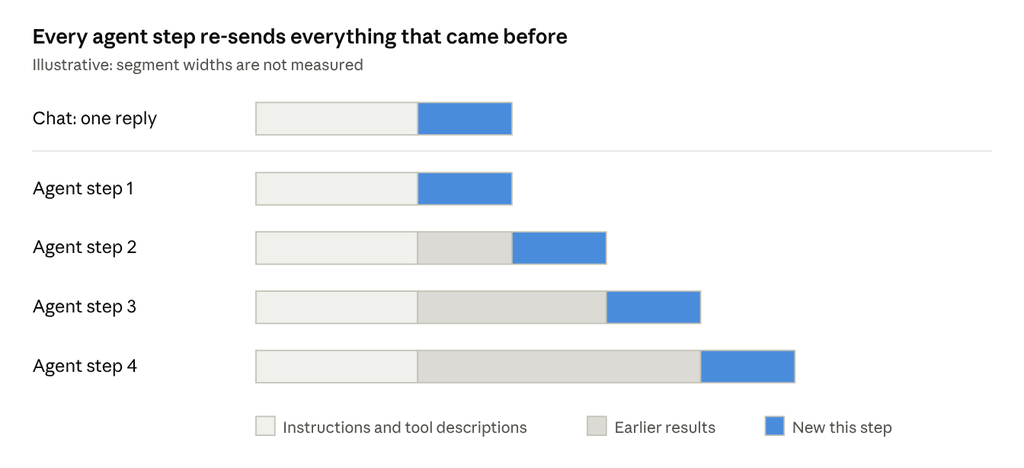
    2. The context snowball. At every step the agent re-sends everything so far: instructions, tool descriptions and earlier results. The same review reports Stanford findings that coding agents can use up to 1,000 times the tokens of a simple chat, mostly on input, and that identical agents on identical tasks differed by up to 30 times in cost.

    Context snowball Β· illustrative, 1 chat reply and 4 agent steps

    A chat reads the conversation once. In an agent loop, every block is billed again on each call, so each extra step costs more than the one before.

    3. Reasoning is billed. Reasoning models “think” before they answer, and those hidden tokens are charged. Cisco notes that cost per million tokens has fallen by over 99% in recent years, yet reasoning is expected to push total inference spend up.

    4. Pilots hide the problem. A prototype serves few users with easy cases. Production adds retries, edge cases and power users. Spheron reports that Uber’s Claude Code spend averaged $150 to $250 per engineer per month, with heavy users at $500 to $2,000, which led to a cap of $1,500 per employee per tool.

    Falling prices are not the whole story

    Unit prices are dropping fast. Epoch AI found that the price of reaching a fixed capability level fell between 9 and 900 times per year, depending on the benchmark, and warned the fastest drops may not last. But when one task uses 5 to 30 times more tokens, volume can outrun the discount.

    For enterprises this is also a governance question: who owns the budget, how spend is attributed to teams, and how to keep costs predictable when an agent’s number of steps cannot be known in advance.

    Design elements that keep token use in check

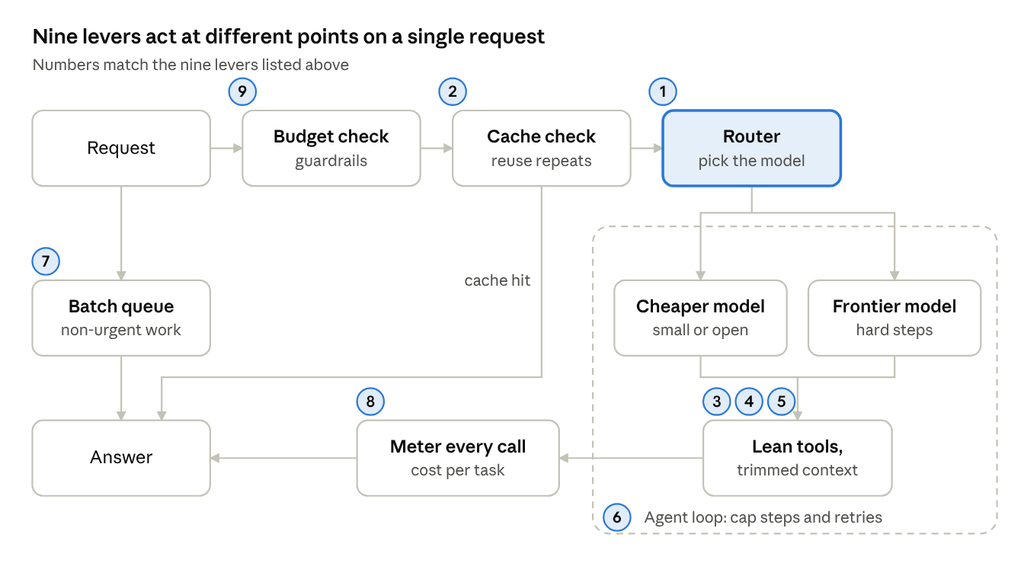
    Good tokenomics is mostly design, not discount hunting. Nine levers, roughly in order of payoff:

    1. Route by difficulty. Send easy steps to a small, cheap model and keep the frontier model for hard ones. In the price table above, the budget model costs 20 times less on input than a mid-range one. MindStudio estimates task-based routing saves 40 to 70%, though that is the author’s estimate, not a measured study.
    2. Cache what repeats. Instructions and reference text that never change can be cached. On Anthropic’s API, cache reads cost 10% of the base input price on most models and 5% on Claude Sonnet 5.5 and Opus 5.5. One reported case study cut LLM cost 59% by lifting its cache hit rate from 7% to 84%, per Spheron.
    3. Trim the context. Send only what the step needs. Retrieve the relevant snippet instead of the whole document, and summarize old conversation history.
    4. Put tools on a diet. Every tool description is re-sent on every call. Cisco reports that loading only the tool definitions a sub-task needs has cut token use by over 98% in some cases. Keep tool outputs short and structured too.
    5. Package know-how as skills. A skill loads just its name and description until the task needs it, instead of stuffing every instruction into every request.
    6. Cap the loop. Set a maximum number of steps, tokens and retries per task, and stop gracefully. Spheron notes that retries can outweigh the rest of a task’s token cost.
    7. Batch the non-urgent. An overnight report does not need an instant answer. Providers offer batch processing at a lower price for work that can wait.
    8. Measure everything. Meter tokens per agent, per task and per team. Track cost per resolution and token yield, not just the monthly total.
    9. Add guardrails. Budgets, alerts and circuit breakers stop a runaway agent before the invoice does.
    Where each lever acts Β· one request, 9 levers

    Read it from the top left: guardrails and the cache can stop or answer a request before any model is called, the router sends each step to the cheapest model that can handle it, and the loop stays inside a cap.

    How open-weight and open-source models help

    Open-weight models publish their trained “weights”, so anyone can download and run them, or pick from many hosting companies. Strictly “open source” also shares training code and data, which is rarer. For tokenomics the practical point is the same: you gain a choice over who runs the model and what it costs.

    Price and quality, side by side

    OpenRouter’s June 2026 review of the open-weight models that matter lists these average prices and Artificial Analysis Intelligence Index scores (higher is better):

    Open-weight modelIntelligence IndexInput ($ per 1M tokens)Output ($ per 1M tokens)
    DeepSeek V4 Flash400.0540.242
    MiniMax M3440.0981.21
    Nemotron 3 Ultra480.4232.61
    GLM 5.2510.4473.31

    The same article puts the top open model, GLM 5.2, about 5 points below Claude Fable 5 on that index. It also reports DeepSeek V4 Pro at 80.6% on SWE-bench Verified, a coding test, which it calls on par with GPT-5.5-class models. Against the price table earlier, DeepSeek V4 Flash’s first-party output rate of $0.28 per million tokens is about 180 times below Claude Fable 5.1’s $50.

    Two caveats from that review: DeepSeek’s own API retains and trains on user data, and Western hosts that do not train on your data charge about double.

    Same workload, very different bills

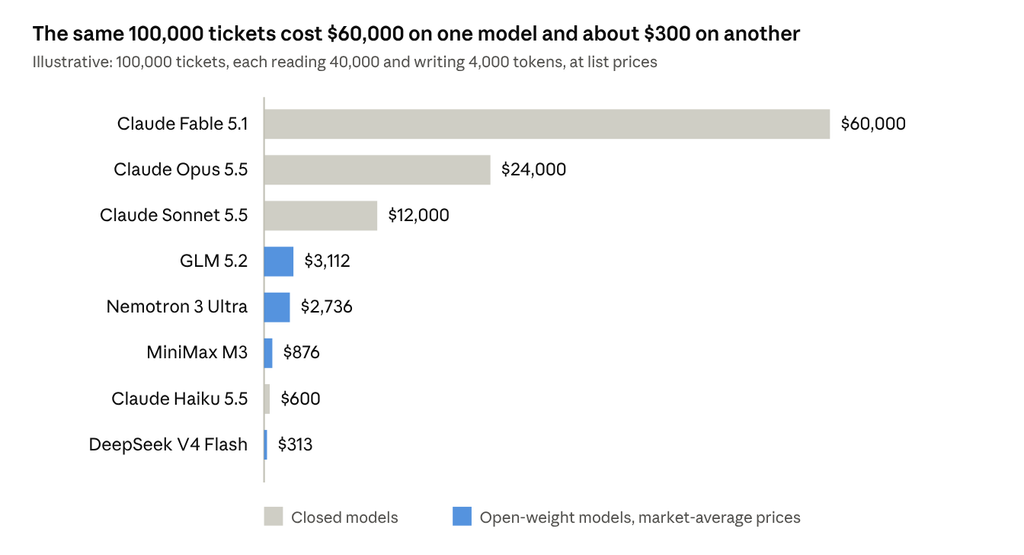
    Illustrative cost Β· list prices from BenchLM (15 Oct 2026) and OpenRouter (June 2026), 8 models

    The chart reuses the support ticket from earlier. Quality is not equal across these models and open-weight prices are market averages, so read it as a sense of scale, not a buying guide.

    Where they help

    • Lower unit cost. The table speaks for itself, especially for high-volume work.
    • Right-sizing. A small model can classify emails or extract fields for a fraction of a frontier model’s price, which pairs well with routing.
    • Control. Running a model in your own cloud keeps sensitive data in-house, which matters in regulated industries.
    • Predictable spend. Self-hosting turns a per-token meter into an infrastructure cost, easier to budget when traffic is steady.
    • Efficiency tuning. You can apply caching, batching and model compression yourself, rather than waiting for a provider to.

    Read the fine print

    Cheaper per token is not always cheaper per task. In an example from investor Bindu Reddy, reported by MindStudio, Kimi K3 costs about half of GPT 5.1 per token but needs more tokens, so a completed task costs 84 cents against 96 cents, only about 12.5% less.

    Self-hosting has its own bill. Layer3 Labs warns that idle rented GPUs quietly drain budgets, that engineering time is often the largest yearly line item, and that you should stress-test costs at 30 to 50% GPU utilization, not 100%. Benchmarks also vary: the gap to closed models is small on some coding and knowledge-work tests and wider on the hardest reasoning tasks.

    The hybrid pattern

    Most teams land on a mix. Open models handle high-volume, well-defined work, frontier models handle the hardest steps, and a router decides between them. It is the routing idea from the previous section with a wider menu.

    A simple framework to get started

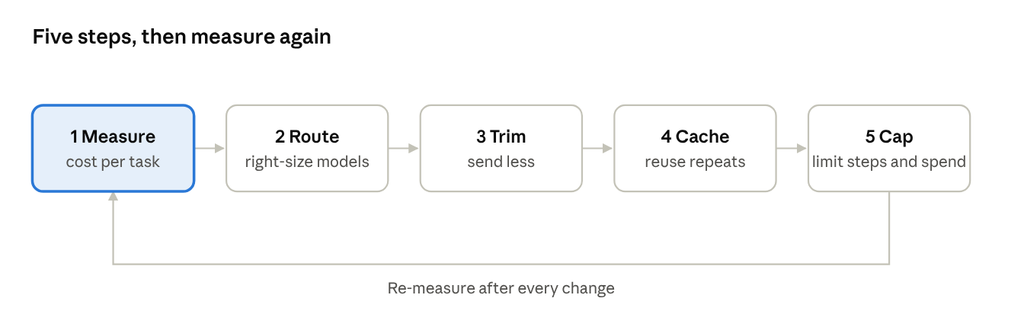
    You do not need to do all nine levers at once. Start with five steps you can finish in a week:

    1. Measure. Count tokens and cost for one real workflow, end to end. Work out the cost per completed task, not per call.
    2. Route. Pick the easiest third of the steps and test a cheaper model on them. Keep the better model for the rest.
    3. Trim. Look at what you send on each call. Cut instructions, history and tool descriptions that the step does not need.
    4. Cache. Move the unchanging parts, such as instructions and reference text, to the front and turn on caching.
    5. Cap. Set a limit on steps, retries and spend per task, with an alert when it is close.
    Getting-started cycle Β· 5 steps, 1 loop

    Re-measure after each step. The goal is a lower cost per successful outcome with quality held steady, not the smallest token count.


    TL;DR

    • What Tokenomics covers: Tokenomics is the economics of AI tokensβ€”how many tokens a task uses, what each costs, and what you get in return, framed as cost, value and efficiency of token consumption.
    • What a token is and the key types: A token is a small chunk of text; the main types are input tokens, output tokens, context window, cached tokens, and reasoning tokens, each contributing to cost.
    • The real metric: cost per task: Prices per token miss the bigger picture; cost per resolution or per task accounts for token usage across a workflow and is the practical measure of spending.
    • Why tokenomics is becoming critical: Agentic systems loop, the context snowball grows with every step, reasoning is billed, and pilots hide the problem, all driving token usage higher in production.
    • A simple starting framework to reduce token use: Start with five steps: measure cost per task, route easy steps to cheaper models, trim unnecessary input, cache unchanging content, and cap the loop with limits and alerts.

    The Takeaway

    Design for cost per outcome from day one. Cheaper tokens help, but they do not replace good design: route work to the right model, send less, reuse what repeats, and put a ceiling on every agent. Teams that treat tokens like any other scarce resource will scale agents with confidence, and the rest will scale surprises.

    What is the first workflow in your organization where you would measure cost per task? A worked cost model for a real agent would make a good follow-up.

    Filed Under: AI Agents, Data & AI, Tokenomics Tagged With: agents, ai, aiagents, data, tokenomics, tokens

    A Weekend with OpenClaw : Musings and Learnings

    April 26, 2026 by Ashwin Leave a Comment

    a weekend with openclaw

    Maybe I’m late to the party. Maybe I missed the bus. But when I stumbled across this excellent mini-course, I couldn’t resist building my own “OpenClaw Assistant.”

    This post is a journal of what I set out to do, what I actually did, how it went β€” and where I ended up.

    What I set out to do with OpenClaw?

    My goal is to set up OpenClaw securely and build an “always-on assistant” I can reach through web chat and Telegram.

    Oh, and the most important part: the whole experiment has to stay within my $30 budget.

    What I actually did?

    I used this mini-course as my baseline and starting point.

    Here’s what I procured:

    • Hostinger VPS account (~$15 for a one-month subscription)
    • OpenClaw setup on the VPS (included in the cost β€” follow this guide)
    • Anthropic Claude API credits (~$15)

    The course is neatly broken into bite-sized steps, and here are the ones I chose to follow:

    • Install and secure OpenClaw so that only you and your authorized apps can access your instance (course link)
    • Give your OpenClaw assistant a personality, so it can recognize your style and personalize every interaction (course link)

    First, I named my assistant β€” he will hereafter be known as “Garaka”

    The personality is then shaped through 4 key files:

    1. SOUL.md – define agent identity, his values, way he communicates, hard limits
    2. AGENT.md – operating manual, checklist, rules the agent should follow for memory management and external content
    3. USER.md – briefing document, what agent needs to know about you as a person, distinct from his own identity
    4. MEMORY.md – memory system, daily logs and curated long-term store.Β  Grows over time and improves

    Before going further, take time to understand each of these files deeply β€” this step is crucial (course link)

    • Connect “Garaka” to a channel so you can communicate with him beyond the web chat (course link)

    A Telegram bot is the fastest way to get started, and its APIs are quite mature

    • Enable the “always-on” part so you can schedule tasks, reminders, and more as cron jobs (course link)

    In my case, I have Garaka send me a daily reflection reminder every evening at 9:30 PM.

    • Give Garaka skills so he has clear instructions to accomplish specific tasks (course link)
    1. OpenClaw comes with a set of pre-defined skills
    2. More skills are available on ClawHub and are quite straightforward to install
    3. I gave him two skills β€” document-summary and quick-note β€” both handy and exactly what they sound like!
    • Give Garaka access to web search via the Brave API so he can research topics and deliver richer, more informed responses (course link)
    • Create sub-agents so Garaka can delegate tasks to specialist agents (course link)
    1. Sub-agents are ephemeral workers β€” they operate in their own context, can have their own styles, and hand their outputs back to the main agent (the orchestrator)
    2. This is a clean way to separate responsibilities and enable parallel execution
    3. I created a “writer” sub-agent that specializes in researching a topic, drafting content, and passing it to the main agent for review and approval

    I chose not to enable email access for now β€” I want to get more comfortable with Garaka before handing him the keys to my inbox. If you’d like to go further, this course link walks you through giving your assistant access to emails.

    How it went?

    Overall, the entire setup took me about 3 hours. Here are a few observations along the way.

    • OpenClaw setup stalled and aborted a couple of times. I had to delete and recreate the Docker image before things ran smoothly
    • Expect significant model (LLM) usage during installation. I switched to a lower-tier model (Haiku 4.5) to keep costs down and stay within budget
    • ⚠️ Watch out: Don’t make the mistake of selecting an OS when setting up your VPS. You must choose OpenClaw right from the start β€” otherwise you’ll need to configure it manually and lose access to the templated flow

    Where I ended up with OpenClaw?

    Here is the outcome after the setup and configuration.

    Working web interface to OpenClaw and chat interface to Garaka

    OpenClaw Settings and Configuration

    Garaka rephrasing his working style after initial configuration

    OpenClaw Settings and Configuration

    Telegram bot interface to Garaka

    OpenClaw Telegram bot interface

    Daily scheduled job to send me a reflection reminder

    OpenClaw Settings and Configuration

    Skills enabled for Garaka

    OpenClaw Settings and Configuration

    To conclude…

    • Setting up a personalized agent in a controlled environment was a genuinely enriching experience β€” and the possibilities feel endless!
    • The OpenClaw Mini-course by Aishwarya is a lifesaver for anyone who doesn’t want to get lost in a sea of tutorials or wrestle with OpenClaw’s somewhat unintuitive interface as a beginner
    • Having a team of agents that learns your style, improves with every interaction, and integrates with your tools is a meaningful upgrade over plain LLM interactions!

    Have you gone through this journey yourself? If so, I’d love to hear your thoughts and compare notes!

    Filed Under: AI Agents, Data & AI

    • Page 1
    • Page 2
    • Page 3
    • Interim pages omitted …
    • Page 13
    • Go to Next Page »

    Primary Sidebar

    Connect with me on

    • GitHub
    • LinkedIn
    • Twitter

    Recent Posts

    • Agent Memory : Why Agents Need Memory and How to give them one?
    • AI Tokenomics: How to Cut Down on Agent Costs by Measuring Them Right
    • A Weekend with OpenClaw : Musings and Learnings
    • Agent Evals 101 : Building a Strong Evaluation Framework for AI Agents
    • Enterprise AI Agents: Why Governance is Your Competitive Advantage
    • Topics

      • Data & AI
        • Agent Memory
        • AI Agents
        • Tokenomics
      • Life
        • Leadership
        • Negotiations
        • Personal Finance
        • Productivity
        • Reading
        • Self Improvement
      • Post Series
        • Intro to Blockchain
      • Tech
        • AI
        • Blockchain
        • Career
        • Certifications
        • Cloud
        • Data
        • Enterprise
        • Generative AI
        • Leadership
        • Presentations
        • Reporting
        • Software Design
        • Stakeholders
      • Uncategorized

    Top Posts

    • Communicate your Software Design better with C4 Model
    • 5 Basic Rules of PersonalΒ Finance
    • Simple Productivity Hacks
    • A Framework to Acing Your Next Tech Presentation
    • Life and the Cockroach Theory

    Copyright © 2026 Β· Ashwin Chandrasekaran Β· WordPress Β· Log in
    All work on this website is licensed under a Creative Commons Attribution-ShareAlike 4.0 International License
    The views and opinions expressed in this website are those of the author and do not necessarily reflect the views or positions of the organization he is employed with